
Stylish Name for Instagram — Fancy Display Name Fonts to Copy & Paste
Click any style to copy it to your clipboard!
There are two different name fields on Instagram. One of them accepts stylish Unicode fonts. The other does not. Most people searching for this end up on sites that do not explain which is which — or worse, they generate a name, try to paste it into the wrong field, and assume stylish names do not work on Instagram at all.
They do work. Just in the right place. The generator above has styles that are specifically tested for Instagram's display name field. Pick one, copy it, and the steps below will show you exactly where to paste it.
Display name versus username — the one thing you need to understand first
Instagram has two separate name fields and they have completely different rules.
Your username is the @handle — the one after the @ symbol, the one used in mentions, the one in your profile URL. Instagram restricts this to plain letters, numbers, periods, and underscores. No exceptions. You cannot put a Unicode font style in your username. It will be rejected.
Your display name is the name shown in bold at the top of your profile page — above your bio, below your profile picture. This field accepts Unicode characters. This is where stylish fonts work.
When someone visits your profile, they see both — but the display name is larger, bolder, and the first thing their eye goes to. It is also what appears when you show up in the search results list on Instagram. The username is there, but the display name gets the visual weight.
So: stylish name in the display name field, plain text in the username field. That is the complete rule.
What Instagram actually allows in a display name
The display name field accepts most Unicode characters, including the font styles that work in games like Free Fire and PUBG. A few specifics worth knowing:
- Character limit is 30. More room than gaming platforms — you can use longer names or more decorative borders without hitting the limit as quickly.
- Most font styles work. Cursive, Gothic, bold, italic, double-struck, small capitals, bubble text — all of these display correctly in Instagram display names on current versions of the app.
- Emoji work. Instagram supports emoji in display names and they render reliably across devices. This is different from some gaming platforms where emoji support is inconsistent.
- The name can be changed up to twice in 14 days. After two changes in a two-week window, Instagram locks the field temporarily. Plan your changes accordingly — do not cycle through options repeatedly.
- It updates everywhere immediately. Once you save, the new display name shows across your profile, in comments, in DMs, and in search results straight away.
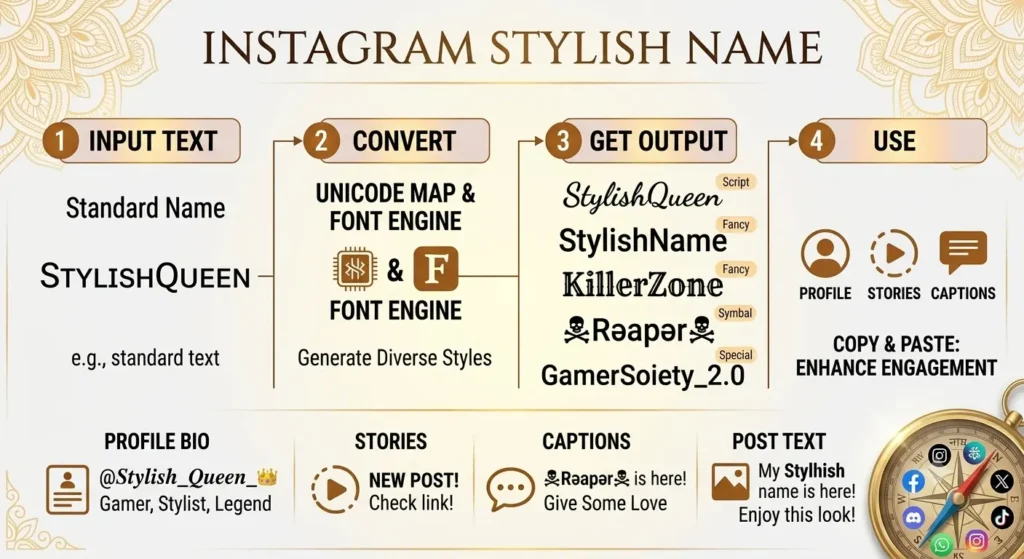
Which stylish Name for Instagram work best on — and which are better for other platforms
Instagram is a visual platform. The people who use it have opinions about aesthetics. That matters when choosing a name style — not because you need to conform, but because a name that matches the visual identity you are going for on Instagram does actual work for your profile, whereas one that clashes with it is just noise.
Cursive — 𝓒𝓾𝓻𝓼𝓲𝓿𝓮
The most popular style for Instagram display names, and for good reason. It reads as personal, elegant, and intentional. Works well at the size display names appear on profile pages. Crosses over cleanly to other platforms — if you use the same name on TikTok or WhatsApp, cursive still looks right in those contexts. If you are building a personal brand across multiple platforms, cursive is the style that ages best. cursive font Instagram bio looks elegant and touchy.
Italic — 𝘐𝘵𝘢𝘭𝘪𝘤
Softer than cursive, more structured. Works well for names going for an aesthetic or artistic feel. Also good for names that include a word like "art," "studio," "creative" — the italic adds a slightly editorial quality that suits those identities.
Bold — 𝗕𝗼𝗹𝗱
Clean and strong. Less decorative than cursive or Gothic, which makes it work well for creator accounts, business profiles, and anyone who wants the name to look confident rather than ornamental. Bold names in Instagram search results stand out from the default weight of surrounding profile names.
Small text — ˢᵐᵃˡˡ ᵗᵉˣᵗ
An underused style on Instagram. Small superscript text in a display name looks unusual in a way that is not aggressive or heavy — it just looks different from every other name in a feed. Works particularly well when combined with emoji or regular text in the Instagram bio name style of bio section.
Gothic — 𝔊𝔬𝔱𝔥𝔦𝔠
More commonly associated with gaming, but it works on Instagram in specific contexts — edgy aesthetic accounts, music-related profiles, anything going for a dark or alternative visual identity. Does not work as well for professional or lifestyle accounts where the aesthetic would clash. Know what your profile is before committing to this one.
Double-struck — 𝔻𝕠𝕦𝕓𝕝𝕖-𝕤𝕥𝕣𝕦𝕔𝕜
Modern, clean, slightly technical-feeling. Works well for accounts in tech, gaming, or design. Reads as professional without being plain. One of the better choices for creators who want a name that works on Instagram and also on LinkedIn or YouTube without looking out of place.
Best Instagram display name ideas 2026 — sorted by what you are going for
Aesthetic and personal — for personal accounts and lifestyle creators
Cursive — the Instagram standard
𝓜𝓸𝓸𝓷𝓵𝓲𝓰𝓱𝓽 𝓢𝓸𝓯𝓽𝓢𝓸𝓾𝓵 𝓔𝓪𝓻𝓽𝓱𝓵𝔂𝓡𝓸𝓼𝓮 Cursive with emoji — works perfectly on Instagram
𝓢𝓾𝓷𝓼𝓮𝓽 🌅 𝓦𝓲𝓵𝓭𝓕𝓵𝓸𝔀𝓮𝓻 🌸 𝓢𝓽𝓪𝓻𝓰𝓪𝔃𝓮𝓻 ✨Italic — understated and editorial
𝘚𝘰𝘧𝘵𝘓𝘪𝘨𝘩𝘵 𝘎𝘰𝘭𝘥𝘦𝘯𝘏𝘰𝘶𝘳 𝘚𝘪𝘭𝘦𝘯𝘵𝘞𝘢𝘷𝘦𝘴
Cute — for girl accounts and personal profiles
Cursive + heart — classic cute Instagram name
♡ 𝓢𝓪𝓴𝓾𝓻𝓪 ♡ 🌸 𝓐𝓷𝓰𝓮𝓵𝓯𝓪𝓬𝓮 🌸 ✿ 𝓢𝔀𝓮𝓮𝓽𝓟𝓮𝓪𝓬𝓱 ✿Small text — subtle and different
ˢᵒᶠᵗᵍⁱʳˡ ˡᵘⁿᵃˢᵗᵃʳ ˢʷᵉᵉᵗᵖᵉᵃBubble text — friendly and playful
Ⓢⓐⓚⓤⓡⓐ Ⓐⓝⓖⓔⓛ Ⓟⓔⓐⓒⓗ
Bold and professional — for creators and business accounts
Bold — stands out in search results
𝗔𝗹𝗲𝘅𝗖𝗿𝗲𝗮𝘁𝗲𝘀 𝗦𝗮𝗿𝗮𝗵𝗦𝘁𝘂𝗱𝗶𝗼 𝗠𝗮𝗿𝗸𝗧𝗵𝗶𝗻𝗸𝘀Double-struck — modern and cross-platform
𝔸𝕝𝕖𝕩𝔻𝕖𝕤𝕚𝕘𝕟𝕤 𝕊𝕒𝕣𝕒𝕙𝔸𝕣𝕥 𝕄𝕒𝕣𝕜𝔹𝕦𝕚𝕝𝕕𝕤Small caps — understated professionalism
ᴀʟᴇxᴄʀᴇᴀᴛᴇꜱ ꜱᴀʀᴀʜꜱᴛᴜᴅɪᴏ ᴍᴀʀᴋᴛʜɪɴᴋꜱ
Attitude — for accounts with edge
Gothic — for dark and alternative aesthetics
𝔇𝔞𝔯𝔨𝔐𝔦𝔫𝔡 𝔖𝔦𝔩𝔢𝔫𝔱𝔖𝔬𝔲𝔩 𝔑𝔦𝔤𝔥𝔱𝔉𝔩𝔞𝔪𝔢Bold italic — confident and sharp
𝙉𝙤𝙁𝙞𝙡𝙩𝙚𝙧 𝙍𝙖𝙬𝙀𝙙𝙜𝙚 𝙐𝙣𝙛𝙞𝙡𝙩𝙚𝙧𝙚𝙙
How to change your Instagram display name
Shorter than you think.
- Copy a name from the generator at the top of this page.
- Open Instagram and go to your profile page.
- Tap Edit profile.
- Tap the Name field — not the Username field. The Name field is where the stylish font goes.
- Delete your existing display name completely.
- Long-press the field and tap Paste.
- Tap Done or the checkmark to save.
Your new display name is live immediately — on your profile, in comments, in DMs, and in search results. No review, no delay.
One thing to be aware of: Instagram limits display name changes to twice per 14-day period. After two changes in that window, the Name field locks temporarily. If you are experimenting with different styles, plan your changes rather than cycling through them quickly — or use a secondary account to test first.
Fancy text Instagram bio
Make your profile pop with a fancy text Instagram bio that's easy to create and instantly eye-catching. Choose a cursive font Instagram bio for an elegant, personal touch, or go bold with an Instagram bio unicode font — stylish Unicode characters that paste directly into your bio, no apps or downloads needed. Free, fast, and fully compatible with Instagram.
Using a stylish name if you are a creator or building a brand
This is slightly different from just wanting a nice-looking profile. If your Instagram name is part of a larger identity — a YouTube channel, a TikTok account, a WhatsApp business name, a Truecaller listing — consistency matters.
A few things that are worth thinking through for Instagram creator name style:
- Cursive and small caps are the most cross-platform styles. They look appropriate on Instagram, do not look out of place on YouTube, and render cleanly in WhatsApp display names. If you are building one name identity across multiple platforms, these two styles survive the most contexts without looking jarring.
- Gothic is gaming-associated. It is fine on Instagram if your content is gaming-related. If it is not, it can create a disconnect between your name style and your actual content — which is a small but real friction for new visitors to your profile.
- Keep the username readable and findable. The @username has to be plain text — this is not a restriction, it is an opportunity. A clean, simple @username that is easy to search and easy to say out loud is more valuable for growth than a complex one. Let the display name carry the visual personality; let the username be the thing people can actually type and remember.
- The same name in a different style on each platform looks intentional. If your Instagram display name is 𝓢𝓪𝓻𝓪𝓱 in cursive and your YouTube channel is 𝙎𝙖𝙧𝙖𝙝 in bold italic, that is not inconsistency — it is the same name adapted to the context of each platform. That kind of thoughtfulness reads as brand identity rather than accident.
A few things people get wrong about Instagram for stylish names
"Stylish names do not work on Instagram." They work in the display name field. They do not work in the @username field. Most people who say this tried the wrong field first.
"Instagram will ban you for using a fancy font name." No. Unicode characters in display names are a supported feature of the app. There is no policy against them. What Instagram does enforce is its content policy — your name cannot contain hate speech, impersonation of a public figure, or other policy violations. A stylish font version of your name is not any of those things.
"You need a third-party app to get stylish Instagram names." You do not. The generator on this page runs in your browser. Copy and paste is the entire process. Any app asking you to connect your Instagram account to generate a fancy name is asking for more access than it needs.
"The character limit is 15." The username limit is 30 characters. The display name limit is also 30 characters. The 15-character limit that appears on some sites is wrong — that was Instagram's username limit in an earlier version of the app and it was changed years ago.
More name styles to explore
- WhatsApp stylish names — if you want the same name style on WhatsApp as on Instagram
- TikTok stylish names — display name styles tested specifically for TikTok
- YouTube stylish names — channel display name styles that work across Google's platform
- Cute stylish names — extended collection of cute and aesthetic name ideas
- Attitude stylish names — for accounts going for a bolder identity
- Stylish names for girls — Aesthetic Instagram name ideas for girls, cute, and soft styles. insta stylish name for girl
- Stylish names for boys — Cool Instagram name ideas for boys, Insta stylish name for boy ideas
- Hindi stylish names — Instagram display names generated from Hindi input
- Urdu stylish names — Urdu-input display names that work on Instagram
Quick answers
Can I use fancy fonts in my Instagram name?
Yes — in your display name (the bold name at the top of your profile). Not in your @username, which only accepts plain letters, numbers, periods, and underscores. The display name field has full Unicode support.
Do stylish names work in the Instagram username field?
No. The @username is restricted to plain characters only. Stylish fonts only work in the display name — the separate name field shown in bold on your profile page.
How do I change my Instagram display name?
Profile page → Edit profile → Name field (not Username) → delete existing → paste new name → Done. Changes go live immediately with no review delay.
What is the character limit for an Instagram display name?
30 characters. This applies to both the display name and the username field separately. The 15-character limit that appears on some sites is outdated and refers to an older version of the app.
How many times can I change my Instagram display name?
Twice per 14-day period. After two changes in a two-week window, Instagram temporarily locks the Name field. Plan your changes rather than experimenting repeatedly — or test on a secondary account first.
Will Instagram ban me for using a stylish name?
No. Unicode characters in display names are a supported feature. Instagram's enforcement is around content policy violations — impersonation, hate speech, that kind of thing. A Unicode font version of your name is not a policy violation.
Can I use the same stylish name on TikTok and WhatsApp?
Yes. Both TikTok and WhatsApp support Unicode in their display name fields. The same cursive or bold font style you use on Instagram will render correctly on both platforms. See the TikTok page and WhatsApp page for platform-specific notes.