
Telegram Stylish Name — Copy & Paste Fancy Telegram Names (2026)
Click any style to copy it to your clipboard!
Telegram is the easiest platform on this entire site to style a name on. The name field has essentially no Unicode filtering — Gothic, cursive, bold, double-struck, small caps, decorative borders, emoji — all of it works. Copy anything from the generator above and paste it into your Telegram profile name field.
Telegram Stylish name vs Telegram username — two different things
Like most platforms, Telegram has two separate identity fields:
| Field | Char limit | Unicode? | Who sees it |
|---|---|---|---|
| Name (first + last) | 64 combined | ✅ Full support | Everyone — contacts, group members, channel subscribers |
| @username | 5–32 | ❌ Plain text only | Used for search and direct links (t.me/username) |
The name field is what appears in every conversation and every group chat. That is where the Telegram stylish name belongs. The username is for discoverability — keep it simple, clean, and easy to type.
Why Telegram names matter more in group chats
On WhatsApp, your name only shows to people who have your number saved. On Telegram, your name is visible to everyone in any group or channel you join — even strangers who have never had contact with you. This makes Telegram names much more public-facing than WhatsApp names.
If you are in a gaming Telegram group — a Free Fire clan chat, a PUBG Mobile community — your styled name is visible to hundreds or thousands of people without them needing to be your contact. The audience for a Telegram name is orders of magnitude larger than for a WhatsApp name.
Name ideas — all styles work on Telegram
Gaming and attitude
Gothic — works perfectly on Telegram
꧁𝔖𝔦𝔩𝔢𝔫𝔱𝔎𝔦𝔩𝔩꧂ ༒𝔇𝔞𝔯𝔨𝔊𝔥𝔬𝔰𝔱༒ 𝔎𝔦𝔫𝔤𝔒𝔣𝔖𝔥𝔞𝔡𝔬𝔴𝔰 𝔙𝔬𝔦𝔡𝔚𝔞𝔩𝔨𝔢𝔯Small caps — clean and distinctive
ᴅᴀʀᴋᴋɪɴɢ ꜱɪʟᴇɴᴛꜱᴛʀɪᴋᴇ ɢʜᴏsᴛꜰɪʀᴇ ᴘʜᴀɴᴛᴏᴍxᴘʀᴏ
Cute and aesthetic — for girls and social channels
Cursive with symbols — full Telegram support
♡𝓢𝓪𝓴𝓾𝓻𝓪♡ 🌸𝓟𝓻𝓲𝓷𝓬𝓮𝓼𝓼🌸 𝓛𝓾𝓷𝓪𝓖𝓲𝓻𝓵 ✨ 𝓢𝓸𝓯𝓽𝓥𝓲𝓫𝓮𝓼 🌙Small text — delicate and unique
ˢᵒᶠᵗᵍⁱʳˡ ˡᵘⁿᵃˢᵗᵃʳ ˢʷᵉᵉᵗᵖᵉᵃ ᵃⁿᵍᵉˡᶠᵃᶜᵉ
Royal and VIP — for clan leaders and channel admins
Gothic with crown — the full royal treatment
👑𝔎𝔦𝔫𝔤𝔒𝔣𝔖𝔥𝔞𝔡𝔬𝔴𝔰👑 ♛𝔔𝔲𝔢𝔢𝔫𝔬𝔣𝔎𝔦𝔫𝔤𝔰♛ 👑𝔈𝔪𝔭𝔢𝔯𝔬𝔯👑Double-struck — modern elite identity
𝕂𝕚𝕟𝕘𝕆𝕗𝕂𝕚𝕟𝕘𝕤 𝔼𝕝𝕚𝕥𝕖𝔸𝕕𝕞𝕚𝕟 𝕍𝕀𝕻𝕄𝕖𝕞𝕓𝕖𝕣
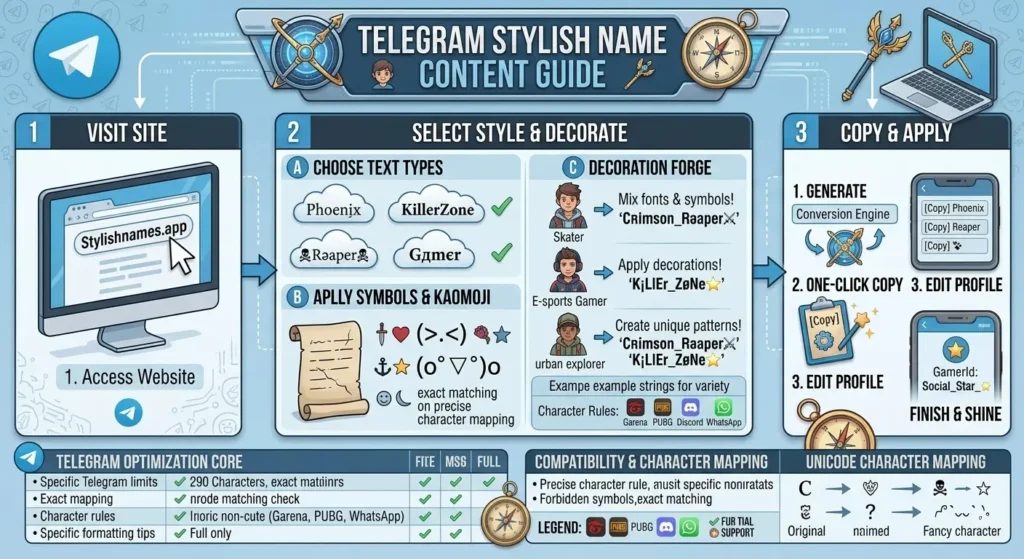
How to change your name on Telegram
- Copy a name from the generator above.
- Open Telegram. Tap the hamburger menu (top-left) → Settings.
- Tap your current name at the top of the settings page.
- Tap the name field, clear it, and paste the new name.
- Tap the tick / save icon. No cost — Telegram name changes are free and unlimited.
Unlike WhatsApp (25-char limit) and Facebook (50-char limit with policy risk), Telegram gives you 64 characters and no restrictions on content. You can change your Telegram name as often as you like.
Telegram vs WhatsApp — which is better for stylish names
| Factor | Telegram | |
|---|---|---|
| Character limit | 64 characters | 25 characters |
| Unicode support | Full — all styles work | Full — all styles work |
| Name visible to | All group members, even strangers | Only contacts who have saved your number |
| Change frequency | Unlimited, free | Unlimited, free |
| Symbol borders | Work completely | Work completely |
| Emoji in name | Full emoji support | Full emoji support |
Telegram is the better platform for stylish names in almost every dimension. The only reason to prefer WhatsApp name styling over Telegram is if your specific audience is primarily on WhatsApp — which for personal contacts and family groups in South Asia is often the case.
More social media name styles
- WhatsApp stylish names — 25-char limit, contact-specific visibility
- Instagram stylish names — display name Unicode, profile-focused
- Discord stylish names — server nickname system
- Attitude stylish names — OP names for gaming groups
- Royal stylish names — king and queen names for group admins
- Stylish names for boys — all moods
- Stylish names for girls — all moods
Quick answers
Does Telegram support Unicode fonts in the name field?
Yes — fully. Gothic, cursive, bold, double-struck, small caps, decorative borders, emoji — all of it works in Telegram's name field. No filtering. The most permissive name field of any major messaging app.
What is the character limit for a Telegram name?
64 characters combined across first and last name. More than double WhatsApp's 25-character limit.
Is it free to change your Telegram name?
Yes — free and unlimited. You can change it as often as you like.
Will my stylish Telegram name show in group chats?
Yes. Your Telegram name appears to everyone in any group or channel you join — including strangers who have not saved your number. It is significantly more public-facing than a WhatsApp name.